

Social Security Financial Department Website Development Services
Custom Websites for Retirement Benefits, Disability Benefits, Survivor Benefits & Appeals Services
A Social Security financial department website should help residents find the right service and book an appointment without confusion. NSP Global Services builds custom websites for retirement benefits services, disability benefits services, survivor benefits services, and appeals and reconsideration teams.
We combine custom UI/UX design, responsive development, accessible content, service information, forms, document libraries, and SEO-ready architecture to help people find what they need and complete tasks quickly.
Free · No obligation
Get a Free Website Proposal
Share a few details and a strategist will get back to you with clear next steps.
What Is Social Security Financial Department Website Development?
Social Security Financial Department website development is the process of designing and building a website specifically for a Social Security financial department. A professional Social Security financial department website combines service information, eligibility and how-to guidance, forms, news and alerts, documents, contact routes, and accessibility into one easy-to-use experience for residents.
Unlike a generic business website, a Social Security financial department website is built around what residents check before they visit: which benefits apply to them, how to book an appointment, required forms, and how appeals work.

Benefits of Professional Social Security Financial Department Website Development
A well-designed Social Security financial department website does more than list basic information. It builds trust, answers the questions residents ask most, and makes it easy to take the next step.

- Help people find services fast
With plain-language pages organized around the tasks people come to complete.
- Reduce calls and visits
By answering common questions online and offering digital forms where possible.
- Publish information transparently
With organized document libraries, reports, and decisions.
- Meet accessibility obligations
With a website designed and tested against WCAG 2.2 AA guidelines.
- Build trust from the first visit
With a professional design that reflects the quality of your organization.
- Improve search visibility
So people searching for your services find the official information quickly.
- Make your organization mobile-friendly
So residents can find information, get in touch, and get directions from their phones.
- Answer common questions
With clear information and FAQs that cut down repetitive calls and emails.
- Track what works
With analytics and conversion tracking on form completions, downloads, and contact requests.
- Strengthen your brand
With a custom visual identity designed around your organization and residents.
Why Does a Social Security Financial Department Need a Professional Website?
Residents visiting a Social Security financial department want clarity above all else. Before they visit, they check which benefits and services apply to their situation, how to book an appointment, which forms they need, and how to appeal a decision.
A professional Social Security financial department website puts this information in one dependable place and gives residents a clear next step.

Your website can help residents:
- Find the right service quickly.
- Check eligibility and what they need to bring.
- Complete forms online where possible.
- Check opening hours and office locations.
- Read news, alerts, and notices.
- Contact the right team.
- Check which benefits apply to a situation.
- Book an appointment without a long wait.
- Find the right form before visiting.
For public bodies, a clear, accessible, dependable website builds trust and reduces pressure on phone lines and front desks.
Social Security Financial Department Website Development for Different Types of Offices & Services
Every Social Security financial department has its own services, responsibilities, and audiences. NSP Global Services creates customized websites based on how your organization actually works and who it needs to reach.
Benefits & Payments Information Website Development
Present an overview of benefits and payments residents can access.
Retirement Benefits Services Website Development
Explain retirement benefits services and how residents can apply.
Disability Benefits Services Website Development
Cover disability benefits services and how residents can start a claim.
Survivor Benefits Services Website Development
Present survivor benefits information for residents who have lost a family member.
Online Account & Portal Access Website Development
Explain how residents can access their online account and services.
Appeals & Reconsideration Services Website Development
Present how residents can appeal or request reconsideration of a decision.
Employer & Payroll Reporting Website Development
Cover reporting services and requirements for local employers.
Public Enquiries & Support Website Development
Present contact options and support for general public enquiries.
Also see our pages for social security office website development, social security attorney website development, and municipal department social defense website development.
Essential Features of a Professional Social Security Financial Department Website
Your website should make it simple for visitors to find what they need, understand what you offer, and take the next step. Depending on your requirements, we can integrate features such as:
Mobile-First Responsive Design
Your website should work seamlessly on smartphones, tablets, laptops, and desktops, so residents can find what they need on any device.
Office Locator & Appointment Booking
Let residents find the right office and book an appointment for a specific service.
Forms & Document Downloads
Organize downloadable forms by service so residents can prepare before visiting an office in person.
Benefit Status Information
Explain how residents can check the status of an existing claim or application.
Public Notices & Updates
Publish public notices and service updates so residents stay informed of any changes.
Task-Based Navigation
Organize the site around what people need to do, not internal departments, so they find services in a few clicks.
Accessible Forms & Documents
Offer accessible online forms and HTML guidance instead of hard-to-read PDFs where possible.
News, Notices & Alerts
Publish news and switch on site-wide alerts for closures, emergencies, or service changes.
Accessibility & Inclusive Design
Build to WCAG 2.2 AA, supporting obligations such as US Section 508 or UK public sector accessibility regulations.
Content Management System
Give your team simple tools to update pages, images, news, and opening hours without technical help.
SEO-Friendly Architecture
Build on search-friendly page structures, metadata, internal links, and fast technical foundations.
Analytics & Conversion Tracking
Measure form completions, downloads, and contact requests, and see which pages residents use most.
What Pages Should a Social Security Financial Department Website Have?
The ideal structure depends on your organization, but most professional Social Security financial department websites benefit from the following pages:

- Home
Introduce your organization, what makes it different, and the main actions residents can take.
- About
Explain your role, responsibilities, leadership, and how you are governed.
- Services & Benefits
An overview of services and benefits available to residents.
- Find an Office
Office locations, hours, and how to book an appointment.
- Forms & Downloads
Downloadable forms organized by service type.
- Appeals & Support
How residents can appeal a decision or get support.
- Services A–Z
Every service with eligibility, steps, and how to get help.
- Documents & Reports
Policies, reports, minutes, and publications in one searchable place.
- Offices & Opening Hours
Locations, opening hours, directions, and accessibility details.
- FAQs
Answer the questions residents ask most before they get in touch.
- News & Notices
Announcements, consultations, and public notices.
- Contact
Give residents convenient ways to call, email, or send an enquiry.
NSP can create a website architecture around the specific residents, services, and journeys of your organization.
Our Social Security Financial Department Website Development Process
We follow a structured process to create a website that reflects your organization and supports its goals.
Social Security Financial Department Website Development & SEO
A great-looking website needs to be discoverable when people search for the services and information you provide.
NSP Global Services builds SEO-ready Social Security financial department websites with task-based service pages, clear headings, and technical foundations designed to help search engines understand your organization, services, and location.

Your website can be structured around relevant search intent such as:
Our approach can include technical SEO, plain-language service pages, internal linking, metadata, government structured data where relevant, and content designed around the questions residents ask.
The goal is to make your website easier for both people and search engines to understand.
AI Search & AEO-Ready Social Security Financial Department Websites
People increasingly use conversational search and AI assistants to find public services, check eligibility, and ask practical questions before they call or visit.
For example, a resident may search:
NSP can structure your website content to provide clear, useful information that helps search engines and AI-powered search systems understand your organization.
Our approach can include:
- Clear question-and-answer content.
- Search-intent-focused headings.
- Entity-focused website architecture.
- Concise answer sections.
- Location and organization information.
- Relevant structured data.
- Strong internal linking.
- Descriptive service and page content.
- FAQ content based on real questions.
- Mobile-friendly and crawlable website architecture.
- Clear information about services, eligibility, forms, and contacts.
Rather than creating content solely around keywords, we organize information around the questions people actually ask and the entities associated with your organization.
How A Social Security Financial Department Website Can Help People Get Things Done
A Social Security financial department website should guide each visitor toward a clear next step instead of simply displaying information.
We design websites around conversion opportunities such as:

Book an Appointment
Let residents find an office and choose a convenient time.
Download a Form
Help residents prepare the right paperwork before visiting.
Learn About Appeals
Give residents a clear overview of the appeals process.
Find a Service
Put the most-used services one click from the home page.
Contact the Right Team
Route enquiries with clear contact options and forms.
Check Opening Hours
Show office hours, locations, and holiday closures clearly.
Read Notices & News
Keep residents informed about changes and consultations.
Sign Up for Updates
Let people subscribe to alerts and newsletters.
Every important action should be easy to find without requiring visitors to navigate through multiple pages.
Common Problems with Social Security Financial Department Websites
Many Social Security financial department websites lose potential residents because important information is hard to find or there is no clear next step.
Common issues include:
- No way to book an appointment online.
- Forms are scattered and hard to find.
- Office locations and hours are unclear.
- Navigation built around the org chart.
- Important information locked in PDFs.
- Accessibility barriers.
- Poor mobile experience.
- Out-of-date notices and hours.
- Broken links to forms and services.
- Weak search visibility for key services.
- Pages staff cannot update.
NSP designs Social Security financial department websites around real journeys, making essential information and actions easy to reach while presenting your organization professionally.
Why Choose a Custom Social Security Financial Department Website?
A generic website template may cover the basics, but a Social Security financial department needs a digital experience built around public services, accessibility, and completing tasks.
A custom website lets your online presence reflect the experience residents can expect when they choose your organization.
How Much Does Social Security Financial Department Website Development Cost?
The cost of developing a Social Security financial department website depends on the size and complexity of the project. Factors that affect pricing include the number of pages, custom design, the CMS, the number of services, forms, document libraries, accessibility testing, content migration, integrations, SEO, content, and ongoing support.

Starter Social Security Financial Department Website
£899
from, one-time
Suitable for smaller Social Security financial departments that need a professional website with essential pages, service pages, contact options, and SEO foundations.
Custom Social Security Financial Department Website
£1,899
from, one-time
Suitable for established Social Security financial departments that need custom design, task-based navigation, accessible forms, a document library, integrations, and stronger SEO.
Advanced Social Security Financial Department Website
£3,899
from, one-time
Suitable for larger or multi-location Social Security financial departments that need multiple departments, portals, translation, advanced integrations, or custom functionality.
NSP Global Services can recommend an appropriate website approach based on your goals, audience, and required functionality.
Why Choose NSP Global Services for Social Security Financial Department Website Development?
Choosing the right development partner means looking beyond visual design. Your website should support your organization, the residents it serves, search visibility, and your long-term goals.

Industry-Focused Website Strategy
We plan websites around the needs of Social Security financial departments and the residents they serve.
Tailored UI/UX Design
Your website is designed around your organization’s identity and the journeys residents take most often.
Mobile-Friendly Development
We build responsive websites that work consistently across phones, tablets, laptops, and desktops.
Conversion-Focused Architecture
We make the actions that matter, such as find a service, complete a form, check opening hours, and contact the office, easy to find.
SEO-Ready Development
We build technical and content foundations that support organic and local search visibility.
AI-Search-Ready Content
We structure information so search engines and AI assistants can understand your services, location, and organization.
Ongoing Website Support
We can provide updates, maintenance, performance monitoring, and improvements after launch.
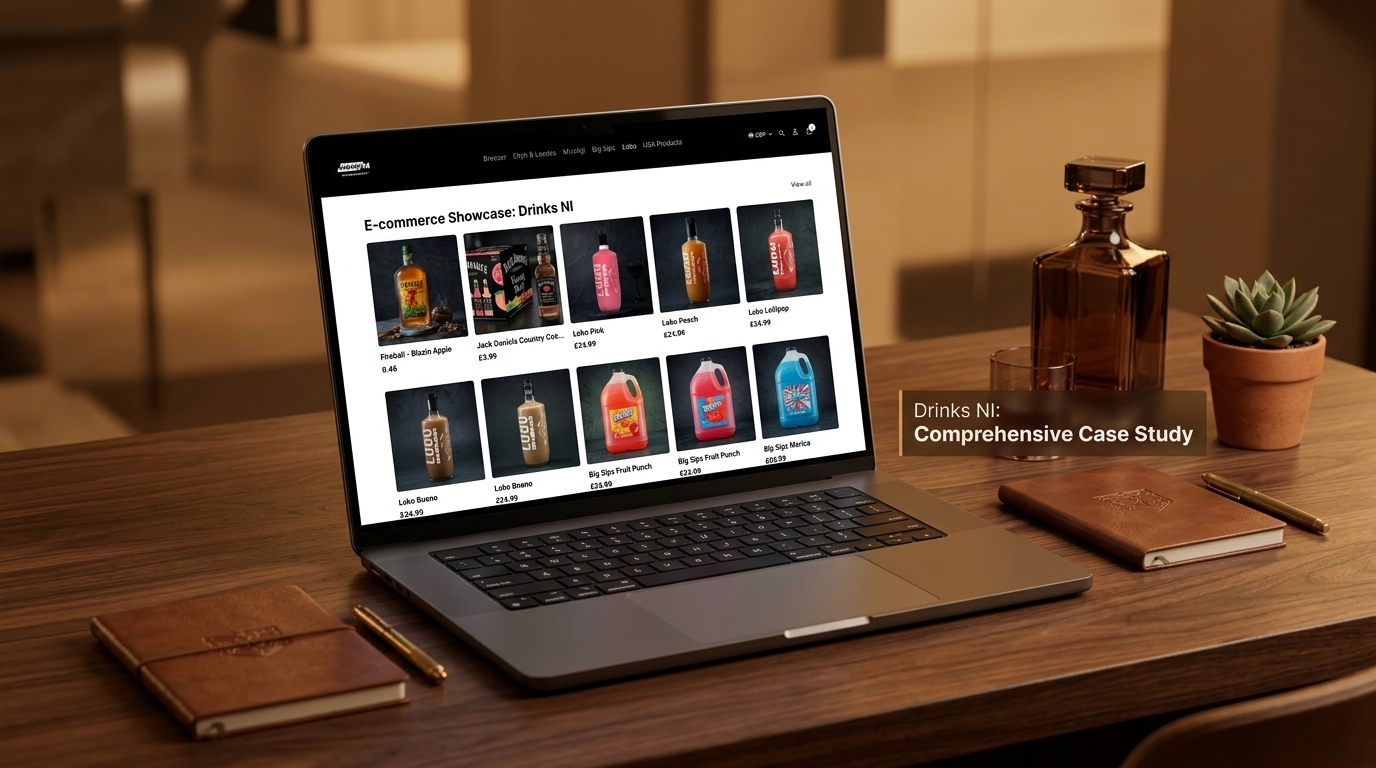
Case Study – DrinksNi
Ecommerce Website Development
NSP Global Services developed a high-performance ecommerce platform for DrinksNi, a digital experience requiring strong product discovery, brand presentation, intuitive navigation, and a conversion-focused customer journey.
Key Development Highlights
The project demonstrates our ability to develop fast, well-structured digital experiences with clear journeys for every visitor. The same approach to clear navigation, fast pages, and well-structured content carries across to Social Security financial department websites, where residents need to find the right information quickly.
What Can a Professional Social Security Financial Department Website Help You Achieve?
A strategically developed website can support several important goals:

- Help people find services faster.
- Reduce calls and visits for basic questions.
- Increase online form completion.
- Improve accessibility for every visitor.
- Publish information transparently.
- Keep residents informed.
- Strengthen public trust.
- Make required information easy to find.
- Support staff with easier updates.
- Provide measurable service data.
Your website becomes more than an online brochure—it becomes a central digital channel for your organization.
Frequently Asked Questions About Social Security Financial Department Website Development
Give Your Social Security Financial Department a Website People Can Rely On
Your department deserves a website that helps residents find the right service quickly.
Whether you run one office or a network of services, NSP Global Services can create a website tailored to your residents, services, and staff.
From custom UI/UX design and accessible service pages and forms to SEO and ongoing support, we can help you build a stronger digital presence for your organization.
Ready to build your Social Security financial department website?
Our Other Digital Marketing & Website Services
Build a stronger online presence with NSP Global Services’ related services for Social Security financial departments and other government organizations:
Government Marketing
Digital marketing and SEO for government organizations.
Technical SEO
Fix the technical issues that hold back large or complex websites.
Website Redesign
Rebuild an outdated website without losing content or rankings.
Website Design & Development
Custom websites, eCommerce, and web applications built to convert.